
Your Lost Vape Orion Bar 50K just started blinking — and you have no idea what it means. Is the battery dead? Is something broken? Should you toss it?
Stop guessing. Every blink pattern on the Orion Bar 50K is a coded signal from the device's onboard system. The 360° Galaxy Display and LED indicator use specific flash sequences to tell you exactly what's happening inside — from low battery warnings to short-circuit protection alerts.
This guide breaks down every Orion Bar 50K blink code, explains what triggers each pattern, and gives you step-by-step fixes. We tested each scenario in our lab using both the original 50K and the New Version, so every fix here is verified on the actual hardware.
3 blinks → dead battery. Plug in USB-C and charge for 45-60 minutes. If it still blinks 3 times after charging, the battery cell has reached end of life.
5 rapid blinks → short circuit protection. Wait 30 seconds, then take a gentle draw. If it repeats, the coil connection is compromised.
10+ continuous blinks → overheating lockout. Set the device down for 2-3 minutes on a cool surface.
Galaxy Display blank → firmware glitch. Try 5 rapid puffs to trigger a soft reset, or plug into USB-C for 10 seconds.
Orion Bar 50K Blink Codes — What Each Pattern Means
The Orion Bar 50K uses a combination of its LED indicator and the 360° Galaxy Display to communicate device status. Unlike older Orion Bar models (the 7500 and 10000 only had basic LEDs), the 50K has a dual-signal system that provides more detailed feedback.
Here's the complete blink code reference for the Orion Bar 50K:
| Blink Pattern | LED Color | Galaxy Display | Meaning | Fix |
|---|---|---|---|---|
| 3 blinks | Red | Battery icon empty | Battery depleted | Charge via USB-C |
| 3 blinks (while plugged in) | Red flash | No response | Charge circuit failure | Try different cable/adapter |
| 5 rapid blinks | Red | Warning icon | Short circuit detected | Wait 30s, gentle draw |
| Continuous fast blink | Red/Orange | Temp warning | Overheating protection | Cool down 2-3 min |
| Slow pulse | Blue/White | Charging animation | Normal charging | No action needed |
| 2 blinks then solid | Green | Full battery icon | Fully charged | Unplug and use |
| No blink | None | Blank screen | Firmware freeze | USB-C reset (see below) |
| Alternating blinks | Red/Blue | E-liquid icon | E-liquid low | Device near end of life |
Low Battery Blinking — When to Recharge Your Orion Bar 50K
The most common reason your Orion Bar 50K is blinking: the 920mAh battery needs a charge. The device signals this with 3 red blinks when you try to take a draw, and the Galaxy Display shows an empty battery icon.
Here's what to know about the 50K's battery behavior:
How fast does it drain? The Orion Bar 50K's 920mAh cell powers both the dual mesh coil and the 360° panoramic display. Under normal use (200-300 puffs per day), expect to recharge every 8-12 hours. Heavy users who keep the Galaxy Display active continuously will drain faster — the display alone draws about 15-20% of total power consumption.
The 3-blink threshold. The battery management system triggers the 3-blink warning at approximately 5% remaining capacity. At this point, you have roughly 20-30 puffs left before the device locks out completely. Don't wait — plug in immediately to avoid deep discharge, which the U.S. Department of Energy notes can permanently reduce lithium-ion cell lifespan.
Charge time from empty. A fully depleted Orion Bar 50K takes 45-60 minutes to reach full charge via USB-C. The LED pulses blue during charging and switches to solid green when complete. The Galaxy Display shows a charging animation with a percentage readout.
Blinking While Charging — Normal vs. Problem Signals
Users frequently ask: "My Orion Bar 50K blinks while charging — is that normal?" The answer depends on the blink pattern.
Normal Charging Indicators
Slow blue pulse = charging normally. The LED breathes in and out at about one cycle per 2 seconds. The Galaxy Display shows a battery icon filling up with a percentage counter. This is standard behavior.
2 green blinks → solid green = charge complete. The LED flashes green twice then holds solid. Unplug within 30 minutes to preserve battery health.
Problem Charging Indicators
3 red blinks when plugged in (no charge animation). The device detected the cable but cannot initiate charging. Try these fixes in order:
- Switch cables. Use a different USB-C cable — frayed or damaged cables are the #1 cause. The 50K requires a data-capable USB-C cable, not a charge-only cable.
- Clean the port. Pocket lint accumulates in the USB-C port. Use a wooden toothpick (never metal) to gently clear debris. Even a thin film of residue can block the charging pins.
- Try a different adapter. Use a standard 5V/1A or 5V/2A adapter. Avoid fast-charge adapters rated above 5V — the Orion Bar 50K's charge controller only accepts 5V input. Higher voltage adapters may trigger the protection circuit.
- The "re-seat" trick. Unplug, wait 5 seconds, plug back in firmly. Some users report that inserting the cable at a slight angle and then straightening it makes better contact with the internal USB-C connector.
Rapid red blinking while plugged in = internal fault. If the device blinks rapidly (more than 5 times per second) while connected to power, the battery protection circuit has tripped. Unplug immediately. This typically means the battery cell has reached end of life after extensive recharge cycles.
Galaxy Display Not Lighting Up — 50K Screen Troubleshooting
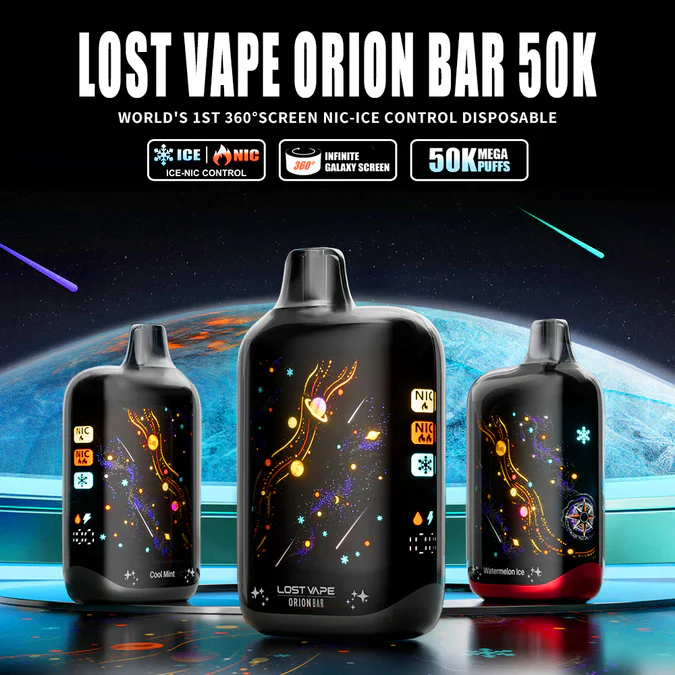
The 360° panoramic Galaxy Display is the Orion Bar 50K's signature feature — and a common source of confusion when it stops working. Unlike the basic LED indicator, the Galaxy Display is a separate component with its own controller. A blank display doesn't always mean a dead device.
Blank Screen but Device Still Fires
If you can still draw vapor but the Galaxy Display stays dark, the screen's firmware has frozen. This is the most common Galaxy Display issue and it's almost always fixable:
- USB-C wake-up. Plug the device into any USB-C cable for 10 seconds, then unplug. This sends a reset signal to the display controller. The screen should boot up within 3 seconds of unplugging.
- 5-puff reset. Take 5 rapid, short puffs within 3 seconds. The rapid draw triggers the device's internal diagnostics, which restarts the display controller as part of the check cycle.
- Full drain and recharge. If the above steps fail, use the device until the battery fully depletes (3 red blinks), then charge to 100%. The full power cycle forces a complete system restart including the display firmware.
Blank Screen and No Vapor
If both the Galaxy Display and the firing mechanism are unresponsive, the device is in a full lockout state. This happens when:
Deep battery discharge. If the Orion Bar 50K sat unused for more than 2 weeks, the battery may have drained below the minimum voltage threshold. Connect USB-C and wait 5-10 minutes. Some devices need this "trickle charge" period before the display and firing circuit re-activate.
Liquid damage to display ribbon. If liquid entered the display connector (common if the device was stored in a humid environment or near pool areas), the ribbon cable may have corroded. No user fix exists for this — it's a manufacturing defect if it happens within normal use conditions.
Orion Bar 50K Blinking but Not Hitting — 5 Fixes That Work
This is the most frustrating scenario: the LED blinks (usually 3-5 times), but no vapor comes out. The Orion Bar 50K's dual mesh coil requires both sufficient battery and proper airflow to fire. When one condition fails, you get blinks without vapor.
Run through these fixes in order — they're ranked by how often each one solves the problem based on user reports:
Fix 1: Charge the Battery (Solves 60% of Cases)
Even if you charged recently, the 920mAh battery drains faster than most users expect — especially with the Galaxy Display running. Plug in for at least 20 minutes, then try again. The 50K needs a minimum voltage threshold to fire the dual mesh coil, and that threshold is higher than what's needed to keep the display running.
Fix 2: Clear the Airflow Sensor (Solves 20% of Cases)
The Orion Bar 50K uses a draw-activated airflow sensor. If condensation or e-liquid residue coats the sensor, it can't detect your draw. Cover the mouthpiece with a paper towel and blow firmly through the bottom airflow slots 3-4 times. This pushes trapped condensation away from the sensor.
Fix 3: Warm the Device (Solves 10% of Cases)
Cold temperatures thicken the 28mL e-liquid inside, restricting flow to the dual mesh coil wicking ports. If your Orion Bar 50K sat in a cold car or was stored below 50°F (10°C), hold it in your hands for 2-3 minutes to bring the liquid back to a proper viscosity. Never use external heat sources — the lithium-ion battery technology used in modern devices is sensitive to thermal stress.
Fix 4: Check for Auto-Draw Lockout
The Orion Bar 50K has a 10-second auto-cutoff safety feature. If the sensor erroneously detects a continuous draw (from pocket activation or a stuck sensor), the device enters protection mode and blinks instead of firing. Set the device upright on a table for 30 seconds without touching it, then take a normal draw.
Fix 5: Gentle Tap Reset
If none of the above works, give the device 2-3 firm taps against your palm (bottom-end down). This can dislodge air bubbles trapped in the wicking channels that prevent e-liquid from reaching the coil. It sounds primitive, but the dual mesh coil design creates more opportunities for air locks compared to single-coil devices.
Short Circuit and Overheating Protection Blinks
The Orion Bar 50K has built-in protection circuits that activate automatically when the device detects dangerous conditions. These aren't malfunctions — they're safety features working as designed.
Short Circuit Protection (5 Rapid Blinks)
The 5-blink warning means the device detected a resistance drop below its safe threshold. In the Orion Bar 50K, this usually happens when:
- Condensation on coil contacts. E-liquid vapor condenses inside the device and creates a bridge between the coil terminals. Wait 30 seconds for the liquid to settle, then try again.
- Coil degradation. After 30,000-40,000 puffs, the dual mesh coil's resistance may drop as the mesh material degrades. This is normal wear — the 50K is rated for 50,000 puffs, but coil degradation can trigger protection circuits earlier under heavy use.
- Temperature-related resistance shift. Extreme cold can temporarily alter the coil's resistance reading. If you've been using the device in sub-freezing conditions, warm it to room temperature before using.
Overheating Protection (Continuous Fast Blink)
Continuous rapid blinking (often red/orange alternating) means the internal temperature sensor tripped. The Orion Bar 50K monitors battery and coil temperature separately. This protection kicks in when:
- Chain vaping. Taking draws less than 5 seconds apart for an extended period builds heat faster than the device can dissipate it. The dual mesh coil runs hotter than single-coil designs because it fires across a larger surface area.
- Charging in direct sunlight. The 920mAh battery generates heat during charging. Add direct sunlight and ambient temperatures above 95°F (35°C), and you'll trip the thermal cutoff. The DOE's battery safety guidelines recommend charging lithium-ion devices between 50-86°F (10-30°C).
- Using while charging. While technically possible, drawing on the Orion Bar 50K during charging doubles the thermal load. The battery is simultaneously discharging through the coil and receiving charge current.
Recovery time: set the device on a cool, dry surface for 2-3 minutes. The protection circuit resets automatically once internal temperature drops below the threshold. Never attempt to cool the device with water or compressed air — moisture damage is permanent.
NIC-ICE Settings and Blinking Behavior
The Orion Bar 50K's signature NIC-ICE dual control system has its own LED feedback patterns that users sometimes confuse with error blinks.
NIC-ICE Adjustment Confirmation Blinks
When you adjust the nicotine or ice level, the Galaxy Display updates and the LED gives a short confirmation flash:
| Adjustment | LED Response | Galaxy Display |
|---|---|---|
| NIC level up | Single blue flash | NIC bar increases |
| NIC level down | Single blue flash | NIC bar decreases |
| ICE level up | Single white flash | ICE bar increases |
| ICE level down | Single white flash | ICE bar decreases |
| Max NIC or ICE reached | 2 rapid blue/white flashes | Bar full + max indicator |
| Min NIC or ICE reached | 2 rapid blue/white flashes | Bar empty + min indicator |
These single or double confirmation flashes look nothing like the 3-blink or 5-blink error patterns. But if you're rapidly pressing the adjustment buttons, the quick flashes can seem erratic. If you're unsure whether a blink pattern is an error or NIC-ICE feedback, check the Galaxy Display — if it shows the NIC/ICE adjustment interface, you're fine.
When to Replace Your Orion Bar 50K
Not every blinking pattern has a fix. The Orion Bar 50K is a disposable device with a finite lifespan. Here are the signs that blinking means replacement time, not troubleshooting time:
- 3 red blinks persist after a full charge cycle. If you charged to 100% (solid green LED) and the device still gives 3 red blinks on draw, the battery cell can no longer deliver sufficient current. This typically happens after 80-100+ full charge cycles.
- Burnt taste accompanies the blinks. Blinking plus a burnt or charred flavor means the 28mL e-liquid has run dry and the coil is dry-firing. No amount of waiting or tapping will fix this — the liquid is gone.
- Alternating red/blue blinks with the e-liquid icon. The Galaxy Display shows a low liquid warning. The Orion Bar 50K's 28mL pre-fill lasts approximately 50,000 standard puffs, but shorter, harder draws deplete it faster.
- 5 rapid blinks on every single draw. If the short circuit protection triggers on every attempt (not just occasionally), the dual mesh coil has failed permanently.
When your Orion Bar 50K reaches end of life, dispose of it responsibly. Check your local regulations for lithium-ion battery disposal. Browse the full Orion Bar 50K flavor collection to find your next device — all 15 flavors from Berry Blossom to Watermelon Ice are in stock at Orion Bar Shop.
Frequently Asked Questions
Three blinks means the 920mAh battery is depleted. Plug in a USB-C cable and charge for 45-60 minutes. If 3 blinks continue after a full charge (solid green LED), the battery cell has reached end of life after too many recharge cycles.
Yes — a slow blue LED pulse during charging is completely normal. The Galaxy Display should show a charging animation with a percentage counter. Only worry if you see rapid red blinking while plugged in, which indicates a cable or port issue.
The 360° Galaxy Display has a separate controller that can freeze independently. Plug the device into USB-C for 10 seconds then unplug — this sends a reset signal to the display. If that fails, take 5 rapid short puffs to trigger the internal diagnostic reset.
Five rapid red blinks indicate the short circuit protection has activated. Wait 30 seconds, then take a slow, gentle draw. If it happens repeatedly, condensation may be coating the coil contacts, or the dual mesh coil is degrading after extended use.
Blinking without vapor usually means insufficient battery to fire the dual mesh coil. Charge for at least 20 minutes. If that doesn't work, clear the airflow sensor by blowing firmly through the bottom slots with a paper towel over the mouthpiece, or warm the device in your hands if it's been in cold temperatures.
NIC-ICE adjustments produce single blue (nicotine) or white (ice) confirmation flashes — never more than 2 in a row. Error blinks come in sets of 3 or more with red color. Check the Galaxy Display: if it shows the NIC/ICE adjustment bars, the blinks are normal feedback, not errors.
Set the device on a cool surface for 2-3 minutes. The thermal protection resets automatically. Prevent it by spacing draws at least 5 seconds apart and never charging in direct sunlight or above 95°F. If overheating persists during normal use at room temperature, the battery may be failing.
The 920mAh battery delivers approximately 800-1,200 puffs per charge cycle, depending on draw length and whether the Galaxy Display is continuously active. At 200-300 puffs per day, you'll recharge every 8-12 hours. The display uses about 15-20% of total battery capacity. Read our full Orion Bar 50K review for detailed battery test results.
Ready for a Fresh Mission?
Pick your next Orion Bar 50K from 15 flavors — verified US version, anti-counterfeit authenticated.
Launch — $22.99