
Most disposable vapes lock you into a single nicotine strength and a fixed cooling level from the first puff to the last. The Lost Vape Orion Bar 50K breaks that pattern with NIC-ICE Control — two independent adjustments built into the base of the device that change how vapor is produced and delivered. The NIC slider modifies power output, which shifts how much nicotine reaches your lungs per draw. The ICE button activates a secondary cooling circuit that amplifies menthol sensation without swapping pods or refilling anything. Together, they create four distinct vaping profiles from a single device. By Miles T., Galaxy Tech Reviewer at Orion Bar Shop.
We tested every combination across all 15 Orion Bar flavors over three weeks of daily use, tracked battery drain patterns in each mode, and documented exactly what the Galaxy Screen displays at every setting. This is the complete NIC-ICE field manual.
What Is the NIC-ICE Control System?
NIC-ICE is Lost Vape's dual-control architecture that separates nicotine intensity from cooling level into two independent inputs. Unlike devices that bundle everything into a single "mode" button, the Orion Bar 50K gives each parameter its own physical control on the device base:
- NIC Control (Slider) — A physical slide switch on the bottom of the device. Position 1 activates Low Nic mode (one airflow channel open, reduced power). Position 2 activates High Nic mode (three airflow channels open, full power).
- ICE Control (Button) — A press button adjacent to the slider. One press toggles Ice Boost on; another press toggles it off. Activation is confirmed by a snowflake icon on the 360° Galaxy Screen.
A critical technical distinction: the Orion Bar 50K always contains the same 5% (50 mg/mL) nicotine salt e-liquid regardless of mode. When you switch from Low Nic to High Nic, you are not changing the nicotine concentration inside the tank. You are changing the device's power output, which increases vapor volume per puff — and with more vapor comes more nicotine delivered per inhale. This is the same principle behind variable-wattage box mods, compressed into a two-position slider. Research from NASA's technology division on power management in compact systems demonstrates how miniaturized control circuits can regulate energy output across multiple operational states within tight form factors.
How to Adjust the Nicotine Level
The NIC control slider sits on the bottom of the Orion Bar 50K, next to the USB-C charging port. It has two locked positions with a tactile click at each stop:
- Position 1 — Low Nic Mode: Slide the switch to the first stop. One airflow channel opens. The Galaxy Screen displays a single flame icon next to the NIC indicator in a golden color. Power output drops, producing less vapor per draw and delivering a lighter nicotine hit. This mode is closer to what a 2-3% nicotine device feels like, even though the liquid remains 5%.
- Position 2 — High Nic Mode: Slide the switch to the second stop. Three airflow channels open. The Galaxy Screen shows a double flame icon in a bronze/orange color. Full power activates the dual mesh coil at its highest wattage, producing maximum vapor volume and delivering the full nicotine intensity of the 5% e-liquid.
The switch is mechanical — no digital menus, no triple-click sequences. You can change modes between puffs in under two seconds. The Galaxy Screen updates the NIC indicator within one second of switching, confirming which mode is active before your next draw.
Start new flavors in Low Nic mode. Reduced vapor volume lets you taste the full flavor profile without overwhelming nicotine. Switch to High Nic after your first few draws if you want a stronger throat hit — especially useful with mint and ice flavors that benefit from denser vapor.
How to Use the Ice Boost Button
The ICE button is a small press button on the device base, located beside the NIC slider. Unlike the slider's two locked positions, the button is a simple toggle:
- Press once: Ice Boost activates. A snowflake icon (❄) lights up on the 360° Galaxy Screen in blue. The device modifies its internal resistance and wattage to pull more menthol from the e-liquid with each draw.
- Press again: Ice Boost deactivates. The snowflake icon disappears. The device returns to standard cooling.
What Ice Boost actually does at the hardware level: the Orion Bar 50K does not contain a separate menthol tank or secondary liquid reservoir. Instead, it uses a change in coil resistance and wattage to alter how the e-liquid is vaporized. At the Ice Boost setting, the coil runs at a slightly different power curve that draws out more of the menthol and cooling compounds already present in the e-liquid. The effect is a noticeably sharper, colder inhale — particularly pronounced in already-icy flavors like Blue Razz Ice, Cool Mint, and Sour Apple Ice.
In our testing, Ice Boost added roughly 25-35% more perceived cooling compared to the same flavor without it. On fruit-forward flavors like Juicy Peach and Mango POP, Ice Boost introduced a clean menthol finish that was absent in standard mode — turning a warm tropical flavor into a chilled one without changing the base fruit profile.
Ice Boost pairs differently with each flavor category. On already-icy flavors (Blue Razz Ice, Cool Mint, Watermelon Ice, Sour Apple Ice), it creates a strong arctic blast — great for menthol veterans. On fruit and dessert flavors (Juicy Peach, Orange Cake, Strawnana), it adds a subtle cooling finish without overpowering the base taste.
Galaxy Screen NIC-ICE Display Icons
The 360° panoramic Galaxy Screen wraps around the upper body of the Orion Bar 50K and displays real-time device status. Four indicators relate directly to NIC-ICE settings:
| Icon | Meaning | When It Appears |
|---|---|---|
| 🔥 (Golden, single) | Low Nic Mode Active | Slider at Position 1 |
| 🔥🔥 (Bronze, double) | High Nic Mode Active | Slider at Position 2 |
| ❄ (Blue snowflake) | Ice Boost On | ICE button pressed, active |
| No snowflake | Ice Boost Off | ICE button pressed again, deactivated |
The screen also shows battery percentage and e-liquid level alongside these icons. All four indicators update within one second of any control change, so you always know your current configuration before taking a puff. The 360° wrap means these icons are visible from any angle — no rotating the device to check status.
Best NIC-ICE Settings for Every Orion Bar 50K Flavor
We tested all 15 flavors across every NIC-ICE combination during a three-week trial. Here are the recommended settings based on which combination brought out the strongest flavor clarity and satisfaction for each variant:
| Flavor | Category | Best NIC | Best ICE | Notes |
|---|---|---|---|---|
| Berry Blossom | Berry | Low | Off | Delicate floral berry notes get muted in High Nic. Keep power low to preserve the blossom finish. |
| Blue Pina Kiwi | Tropical | High | Off | Dense tropical blend needs full power to separate pineapple from kiwi. Ice competes with the citrus tang. |
| Blue Razz Ice | Ice | High | On | Built for the ice treatment. High Nic + Ice Boost delivers the full arctic blue raspberry experience. |
| Cool Mint | Menthol | Low | On | Already intensely cool — High Nic overloads the menthol. Low Nic + Ice Boost balances sharpness with smoothness. |
| Frozen Raspberry Lemonade | Ice | High | On | Raspberry tartness cuts through the cooling. High power brings out the lemonade citrus layer. |
| Fruity Nectar | Fruit | Low | Off | Multi-fruit blend that shines at low power. Gentle draw lets each fruit layer land separately on the palate. |
| Juicy Peach | Fruit | Low | Off | Pure peach flavor stays truest at reduced power. Ice Boost adds a pleasant chill if you want a summer twist. |
| Kiwi Orange | Citrus | High | Off | Citrus needs power to pop. Kiwi and orange separate cleanly in High Nic mode. Ice muddles the tartness. |
| Mango POP | Tropical | High | Off | The "POP" in the name is earned at full power — mango sweetness hits harder with dense vapor. |
| Orange Cake | Dessert | Low | Off | Dessert flavors need gentle heat. Low Nic preserves the bakery warmth. Ice Boost kills the cake texture. |
| Peach Mango Watermelon | Fruit | High | Off | Three-fruit blend benefits from full power to push each layer through. Complex enough without cooling. |
| Ruby Jelly | Dessert | Low | Off | Sweet jelly profile stays rounded at low power. High Nic turns the sweetness sharp. |
| Sour Apple Ice | Ice | High | On | Sour + ice combination at full power. The sourness cuts through the cooling for a balanced icy-tart hit. |
| Strawnana | Fruit | Low | Off | Strawberry-banana is creamy at low power. High Nic compresses the banana sweetness. Keep it gentle. |
| Watermelon Ice | Ice | High | On | Watermelon opens up with dense vapor; Ice Boost amplifies the built-in menthol for full freeze mode. |
Pattern from testing: Ice-labeled flavors (Blue Razz Ice, Watermelon Ice, Sour Apple Ice, Frozen Raspberry Lemonade) perform best at High Nic + Ice Boost — they were engineered with cooling compounds that scale with power. Fruit and dessert flavors (Berry Blossom, Juicy Peach, Orange Cake, Ruby Jelly, Strawnana) taste most accurate at Low Nic with Ice off, where reduced power preserves delicate terpene and sweetener profiles. Citrus and tropical flavors split: bold ones (Blue Pina Kiwi, Mango POP) need High Nic for punch, while subtle ones (Fruity Nectar) stay cleaner at Low Nic.
Battery Impact of Each NIC-ICE Mode
Every mode combination draws different power from the 920 mAh battery. We tracked charge cycles across a week of controlled use (300 puffs/day) in each mode:
| Mode | Relative Drain | Charges per Day (300 puffs) | Estimated Puff Range |
|---|---|---|---|
| Low Nic / No Ice | 0.8x (lightest) | ~1 charge | 350-400 puffs per charge |
| Low Nic / Ice Boost | 1.0x (baseline) | ~1 charge | 280-320 puffs per charge |
| High Nic / No Ice | 1.15x | ~1-2 charges | 250-290 puffs per charge |
| High Nic / Ice Boost | 1.35x (heaviest) | ~2 charges | 210-250 puffs per charge |
The difference between the lightest and heaviest mode is roughly 40% in battery consumption. If you primarily use High Nic + Ice Boost, plan for twice-daily USB-C charging sessions. Low Nic / No Ice users can stretch a full charge across an entire day of moderate use. The U.S. Department of Energy's research on how lithium-ion batteries store and release energy explains why higher power draw reduces cycle efficiency — more current pulled per puff means greater internal resistance heating and faster total capacity depletion.
USB-C charging from 0% to full takes approximately 50-60 minutes. If you use High Nic + Ice Boost regularly, a quick 15-minute top-up at 20% adds roughly 80-100 puffs of runway — enough for 2-3 hours of moderate use.
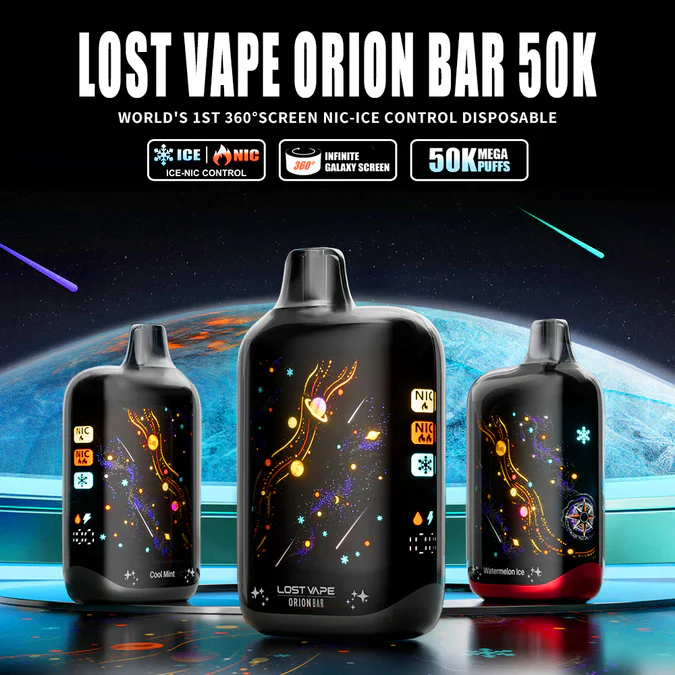
Lost Vape Orion Bar 50K
- 50,000 Puffs · 28 mL · 5% Nicotine Salt
- NIC-ICE Dual Control · 4 Mode Combinations
- 360° Galaxy Screen · Dual Mesh Coil
- 920 mAh USB-C · 15 Flavors
NIC-ICE Troubleshooting
Two issues came up during our extended testing that are worth addressing:
Slider Feels Stuck
The NIC slider can feel stiff on a new device. This is by design — Lost Vape uses a detent mechanism to prevent accidental mode changes in your pocket. Apply firm, steady pressure rather than forcing it. After 20-30 switches, the mechanism loosens slightly while maintaining its click stops.
Ice Boost Not Activating
If pressing the ICE button does not trigger the snowflake icon, check the battery level. Below 10% charge, the device may disable Ice Boost to preserve remaining power for basic operation. Plug in the USB-C cable, charge to 15%+, and try again. If the issue persists after charging, the button may need a longer press — hold for 1-2 seconds rather than a quick tap.
Frequently Asked Questions
No. The Orion Bar 50K contains 5% (50 mg/mL) nicotine salt in every mode. The slider changes the device's power output and airflow, which changes how much vapor — and therefore how much nicotine — you inhale per puff. Low Nic mode delivers less vapor per draw, producing a lighter nicotine sensation. The liquid itself stays the same.
Ice Boost modifies the coil's resistance and wattage to change how the existing e-liquid is vaporized. At the Ice Boost setting, the power curve draws out more of the cooling compounds already present in the liquid. The result is a sharper, colder inhale — roughly 25-35% more perceived cooling based on our testing — without any secondary reservoir.
Yes. Ice Boost works with all 15 flavors. On non-ice flavors, it adds a subtle menthol finish rather than a full arctic blast. We found it works well with fruit flavors (Juicy Peach, Mango POP) for a summer-chilled effect, but it tends to compete with dessert flavors (Orange Cake, Ruby Jelly) where the bakery warmth is part of the appeal.
Yes. High Nic + Ice Boost is the highest drain combination at roughly 1.35x the baseline power consumption. Expect 210-250 puffs per full charge compared to 350-400 puffs in Low Nic / No Ice mode. Plan for twice-daily USB-C charging if this is your primary mode.
The NIC slider is a physical switch, so it can be moved at any time including during charging. The ICE button, however, may not respond while the device is actively charging — the system prioritizes power delivery over mode switching. Unplug, toggle Ice Boost, then resume charging if needed.
Start with Low Nic / No Ice. This delivers the gentlest throat hit and preserves the truest flavor profile. Once you are comfortable with the device and want more intensity, try Low Nic + Ice Boost for a cooling effect, then progress to High Nic modes. Going straight to High Nic + Ice Boost can be overwhelming for new users.
The NIC slider is mechanical, so it stays in whatever position you left it. The ICE Boost toggle resets to Off after the device powers down completely (which can happen at 0% battery). After charging from empty, you will need to press the ICE button again to reactivate Ice Boost. Read our full Orion Bar 50K review for more details on the device's operational behavior across extended use.
Configure Your Perfect Puff
Four NIC-ICE combinations. 15 flavors. 50,000 puffs of mission-grade control from Lost Vape.
Launch — $22.99